
Inhoudsopgave
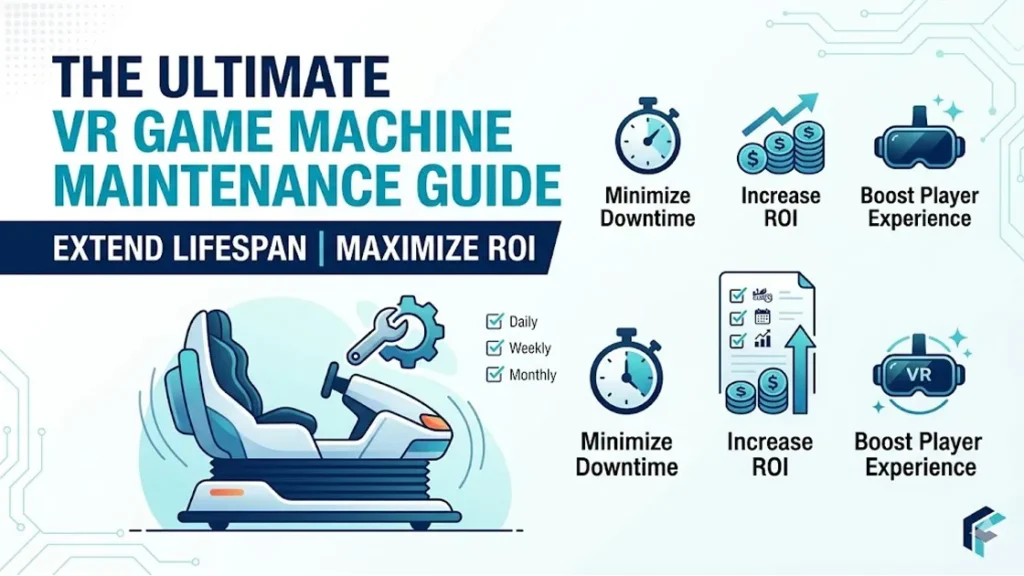
De ultieme onderhoudsgids voor VR-gamemachines: Hoe u de levensduur kunt verlengen en de ROI kunt maximaliseren
In het hedendaagse mondiale commerciële amusements- en familie-entertainmentcentrum (FEC) markt, Investeren in een hoogwaardige VR-arcademachine is een van de snelste manieren om meer bezoekers te trekken en enorme inkomsten te genereren. Echter, er is een onzichtbare variabele die zeer winstgevende locaties scheidt van falende locaties: consistent, rigoureus onderhoud van VR-gamemachines.
Commerciële VR-spelsystemen zijn geavanceerde stukjes techniek. Ze integreren geavanceerde optica, krachtige pc-verwerkingskracht, en precisie-bewegingsbesturingsmechanismen (zoals dynamische platforms met 3 DoF of 6 DoF). Zelfs een klein onderhoudstoezicht kan storingen in de apparatuur veroorzaken, gebruikerservaring downgraden, of een totale systeemstoring veroorzaken.
Deze ultieme gids laat u zien hoe u een gestandaardiseerd systeem implementeert, preventief onderhoudssysteem dat stilstand elimineert, verlengt de levensduur van uw kernhardware, en maximaliseert uw operationele Return on Investment (ROI).
💡Let op: Nieuw in de sector? Sla de fundamentele wiskunde niet over. Maak een bladwijzer van onze
Ultieme gids voor VR-arcademachines.
om uw initiële budgettering in kaart te brengen, bestemmingsplan, en licentiekaders voordat u uw wagenpark finaliseert.
Waarom strikt onderhoud van VR-gamemachines het geheime ROI-wapen van uw speelhal is
Voor een volwassen VR-arcade of FEC, strikte onderhoudsprotocollen zijn geen operationele kosten; ze vormen uw voornaamste inkomstenschild. De bedrijfswaarde van een gestructureerde onderhoudsroutine valt uiteen in drie belangrijke dimensies:
- Het elimineren van kostbare downtime: Tijdens spitsuren, weekenden, of vakanties, een enkele kapotte VR-simulator doet meer dan alleen de kaartverkoop pauzeren. Het veroorzaakt lange rijen, klachten van klanten, en negatieve online recensies die de reputatie van uw merk permanent schaden.
- Exponentieel langere levensduur van activa: Hoogwaardige VR-headsets (HMD's), elektrische servo-actuatoren, en controle-pc's vertegenwoordigen aanzienlijke kapitaalinvesteringen. Gestandaardiseerd preventief VR-onderhoud verlengt de commerciële operationele levensduur van deze assets van standaard 2 à 3 jaar tot ruimschoots 5 jaren.
- Vermenigvuldig de herhaalfrequenties van klanten: Kristalheldere lenzen, zeer responsieve tracking, en volledig gereinigde gezichtskussens zorgen voor een onberispelijke meeslepende ervaring. Perfecte hygiëne en vlekkeloze hardware-uitvoering zijn wat beginnende spelers tot loyale spelers maakt, terugkerende klanten.
De ultieme onderhoudschecklist voor VR-arcademachines (Gecategoriseerd op frequentie)
Om uw floormanagers en technisch personeel te helpen efficiënt te werken, complexe technische zorg hebben wij opgedeeld in een zeer gestructureerde zorg, atomic 9d vr gamemachine Onderhoudsschema:
| Frequentie | Doelkerncomponent | Gestandaardiseerd onderhoudsprotocol | Oosten . Tijd |
|---|---|---|---|
| Dagelijks (Pre- & Post-shift) | VR-headset (HMD) & Lenzen | Reinig lenzen met een droge microvezeldoek en gespecialiseerde, alcoholvrije lensreiniger. Ontsmet de rubberen/siliconen interface met een huidvriendelijk middel, alcoholvrije antibacteriële doekjes. Controleer het gezichtsveld van de VR-headset op eventuele verkeerde uitlijning en pas indien nodig direct aan. | 5 min / machine |
| Dagelijks (Pre- & Post-shift) | Controleurs & Volgers | Veeg de grepen en handgrepen volledig af. Controleer het batterijniveau of breng eenheden terug naar de aangewezen dockingstations. Voer een snelle basislijntracking en knopresponsiviteitstest uit. | 3 min / machine |
| Wekelijks | Bewegingsplatform & Mechaniek | Inspecteer de elektrische cilinders visueel, actuatoren, en lagers van 3-DoF/6-DoF-systemen voor losse bouten of abnormaal geluid. Test de noodstop (E-stop) reactievermogen van de knop. Maak structurele frames schoon. | 15 min / machine |
| Maandelijks | Industriële besturings-pc's & Kabels | Reinig de stoffilters van de pc-behuizing. Inspecteer kabelpaden met veel beweging (zoals 3-in-1 HDMI/DP-kabels) voor draaien, rafelen, of scheuren in de buitenmantel. Optimaliseer de schijfruimte op het besturingssysteem en wis tijdelijke spelcachebestanden. | 30 min / Pc |
| Driemaandelijks | Software, Chauffeurs & Kalibratie | Update VR-gamestarters, stuurprogramma's voor grafische kaarten, en systeembeveiligingspatches. Kalibreer trackingomgevingen opnieuw (Basisstations of inside-out cameragrenzen) driften te herstellen. | 45 min / machine |
Stapsgewijze uitsplitsing van hardwareonderhoud
1. VR-headset en lensverzorging (Optische integriteit en hygiëne)
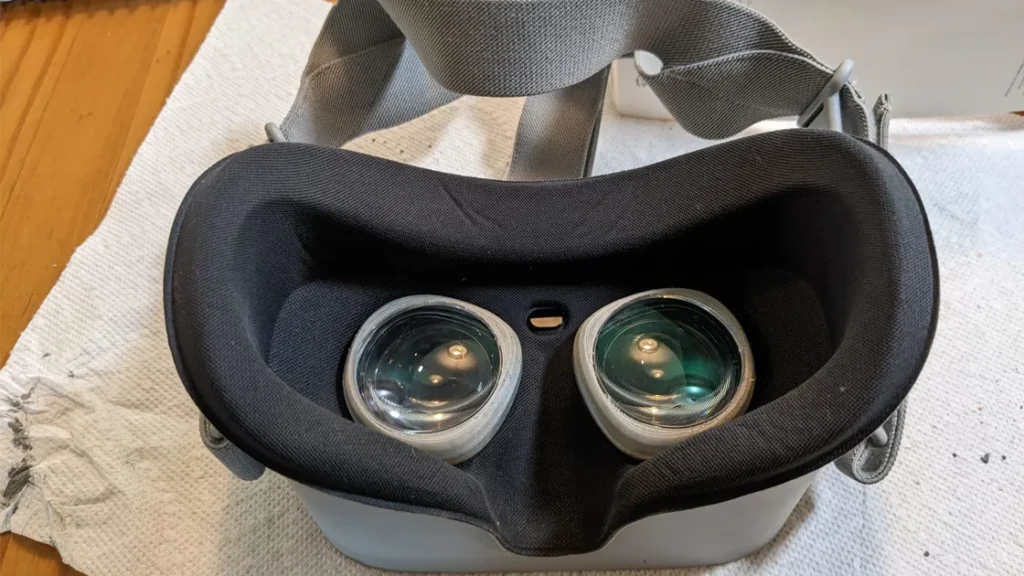
Lenzen en gezichtsinterfaces zijn de fysiek meest gevoelige onderdelen van elk VR-apparaat en de gebieden waar medewerkers het vaakst fouten maken:
- De Do’s: Altijd gebruiken 100% watervrij, alcoholvrije gespecialiseerde optische reinigers voor de lenzen. Als het budget het toelaat, installeer een UV-C-sterilisatiebox van medische kwaliteit bij de receptie om headsets volledig te ontsmetten in een snelle cyclus van 30 seconden tussen spelerssessies.
- De absolute don’ts: Stel de lenzen van de VR-headset nooit bloot aan direct zonlicht of felle studiospots. De lenzen fungeren als vergrootglazen; ze zullen het licht concentreren en de interne LCD/OLED-displaypanelen binnen enkele seconden permanent verbranden. Aanvullend, Gebruik nooit ruwe papieren handdoeken of kleding om lenzen af te vegen, omdat ze onomkeerbare microkrasjes veroorzaken die de gamebeelden vervagen.
2. Onderhoud van bewegingsplatform en mechanisch systeem (Dynamische onderdelen)
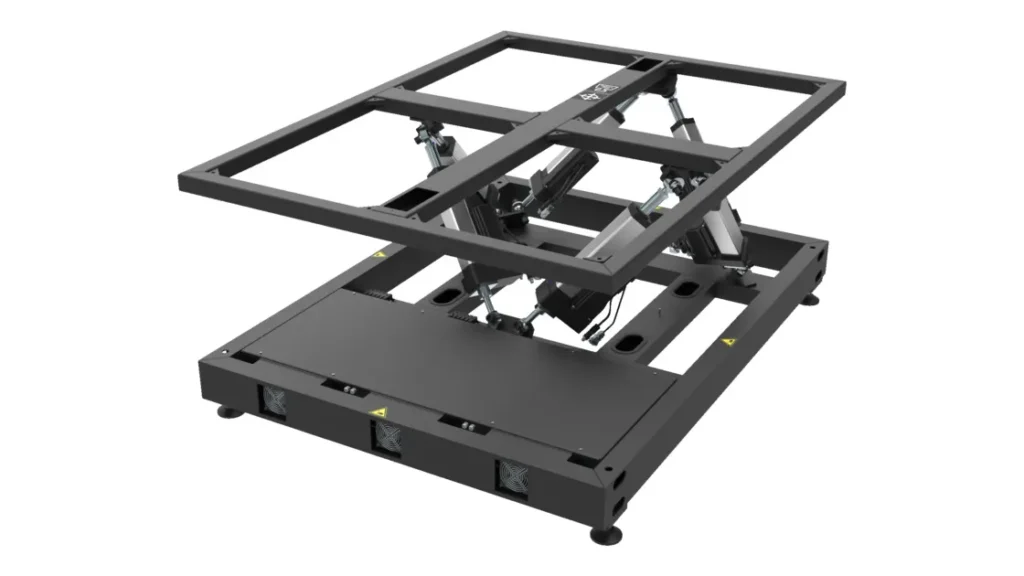
Commerciële kwaliteit, high-fidelity VR-attracties (zoals VR-racesimulators, VR-motorfietsen, of bewegingstheaters met meerdere zitplaatsen) zijn sterk afhankelijk van complexe dynamische platforms:
- Servo-cilinder & Lagersmering: Elektrische lineaire actuatoren kunnen enorme structurele belastingen aan tijdens intense gameplay-bewegingen. Technisch personeel moet regelmatig speciaal vet controleren en opnieuw aanbrengen op de interne aandrijfmechanismen om wrijvingsblokkering te voorkomen, oververhitting van de motor, of burn-outs van actuatoren.
- Bout aandraaien onder hoge trillingen: Simulators die intense trillingen nabootsen, g-kracht, of snelle acceleratie zorgen voor continue schuifspanning op structurele verbindingen. Technici moeten wekelijks een momentsleutel gebruiken om kritische lastdragende bouten te controleren, het voorkomen van mechanische vermoeidheid of structureel falen.
3. Kabelbeheer en slijtagepreventie (Signaaloptimalisatie)
In VR-arcades met veel verkeer, kabelschade behoort tot de drie belangrijkste oorzaken van uitval van apparatuur. Spelers roteren voortdurend, wandeling, en draai, waardoor ernstige fysieke belasting op de datalijnen ontstaat:
- Implementeer een oplossing voor bovenliggende ophanging: Het wordt ten zeerste aanbevolen dat alle VR-attracties die vrij kunnen rondlopen of op kamerschaal worden gemonteerd, aan het plafond worden gemonteerd, intrekbare kabelkatrolsystemen. Hierdoor blijven de 3-in-1 verbindingslijnen veilig boven het hoofd van de speler hangen, voorkomen dat ze worden betrapt, struikelde, of verpletterd door een bewegend bewegingsplatform.
- Trekontlasting bij interfaces: Breng stevige klittenbanden of kabelklemmen aan in de buurt van de pc-aansluitpunten en de ingangspunten van de headset om deze te creëren “trekontlastingszones.” Dit zorgt ervoor dat als er met geweld aan een kabel wordt getrokken, de spanning beschadigt geen dure GPU DisplayPorts of USB-headers op het moederbord.
Softwareoptimalisatie en technische probleemoplossing
1. PC-reinheid en thermisch beheer
Omdat commerciële VR-games op ongelooflijk hoge framesnelheden en resoluties draaien, De GPU en CPU van de besturings-pc werken onder aanhoudend hoge thermische belasting:
- Routinematig diep afstoffen: Door het hoge voetgangersverkeer in speelhallen ontstaan enorme hoeveelheden stof en textielvezels in de lucht. Open maandelijks het pc-chassis en gebruik antistatische persluchtblikken om stofophopingen uit GPU-koelventilatoren en CPU-vloeistofkoelingradiatoren weg te blazen. Dit voorkomt thermische throttling, waardoor gameframes wegvallen, het veroorzaken van ernstige bewegingsziekte bij spelers.
- Updates van het besturingssysteem bevriezen: Automatische Windows-updates zijn de ultieme nachtmerrie voor een commerciële locatie. IT-personeel moet automatische Windows-updates in de achtergrondservices expliciet uitschakelen om te voorkomen dat pc's tijdens kantooruren onverwacht opnieuw opstarten of incompatibele patches toepassen die de VR-gamestarter laten crashen. Alle stuurprogramma-updates moeten vóór implementatie buiten kantooruren grondig worden getest.
2. Kalibratie en diagnostiek op kamerschaal volgen
Het elimineren van externe omgevingsinterferentie: Als spelers klagen “vliegende controleurs,” “zwevend standpunt,” of “schuddende spelbeelden,” het ruimtelijke volgsysteem wordt waarschijnlijk verstoord. Maak eerst de buitenste trackinglenzen of de optische afdekkingen van het basisstation schoon. Volgende, inspecteer en verwijder reflecterende oppervlakken in de speelzone rigoureus (Bijv., grote glazen wanden, spiegels, glanzende metalen borden). Reflecterende oppervlakken weerkaatsen infraroodsignalen en verwarren trackingsensoren.
VR commerciële hygiëneprotocollen: Verander netheid in een marketingwapen
In het moderne commerciële landschap, Consumenten hanteren uitzonderlijk hoge normen voor gedeeld gebruik, draagbare technologie. Het onderhouden van een “Zichtbaar hygiëneprotocol” elimineert niet alleen bacteriën, het functioneert ook als een briljant marketinginstrument dat je speelhal onderscheidt van concurrenten uit het lagere segment:
- Op aanvraag, Transparante ontsmetting: Train uw vloerpersoneel om de VR-headset en controllers vlak voor de klant af te vegen, onmiddellijk voordat ze deze opzetten. Dit eenvoudig, rituele actie creëert een onmiddellijk gevoel van veiligheid en vertrouwen, waardoor de klanttevredenheid en herhalingsintentie direct worden vergroot.
- Professionele inventaris van verbruiksartikelen: Zorg altijd voor een robuuste voorraad wegwerpbare non-woven VR-gezichtsmaskers die gemakkelijk kunnen worden afgeveegd, milieuvriendelijke siliconen vervangende hoezen. Voor premium FEC's, het plaatsen van een strak, verlichte UV-C-sterilisatiekast direct naast de ticketbalie dient als een uitstekende visuele demonstratie van de toewijding van uw locatie aan veiligheid.
Werk samen met een betrouwbare fabrikant van commerciële VR-arcademachines
Terwijl het implementeren van robuuste dagelijkse VR-onderhoudsprotocollen voor gamemachines oplost 80% van routinematige problemen, de ultieme basis voor het minimaliseren van hardwarestoringen en het veiligstellen van winstgevendheid op de lange termijn begint bij de bron: kiezen voor een VR-fabrikant die apparatuur bouwt volgens echte industriële normen en deze ondersteunt met wereldwijde technische ondersteuning.
Commerciële hardwaresystemen (zoals die vervaardigd door FunSpace) ondergaan honderdduizenden rigoureuze stress- en vermoeidheidstests voordat ze de fabrieksvloer verlaten. Nog belangrijker, een elite productiepartner biedt uw bedrijf twee cruciale vangnetten:
- Modulaire hardware-engineering: Mocht een onderdeel defect raken, u hoeft niet de hele simulator terug naar de fabriek te sturen. Door het modulaire ontwerp kan uw personeel op locatie gestandaardiseerde onderdelen hot-swappen via plug-and-play-verbindingen, uw machine weer online krijgen hieronder 5 notulen.
- Eén jaar technische ondersteuning & Diagnose op afstand: Via beveiligde internetprotocollen, Technische experts van de fabriek kunnen direct inloggen op de besturings-pc's van uw locatie om complexe softwareafwijkingen op te lossen, het opnieuw kalibreren van trackingmatrices, en geef een waar 24/7 operationeel vangnet voor uw investering.
Heeft u vragen over het opzetten van uw faciliteit?? Of u nu een aangepast onderhoudsschema nodig heeft dat is afgestemd op de footprint van uw locatie of op zoek bent naar uiterst duurzaam, onderhoudsarme commerciële VR-simulators, [Contact Ons]
Veelgestelde vragen
Deze situatie komt vaak voor bij VR-spelmachines; de overgrote meerderheid van de apparaten is voorzien van een kalibratieknop. U hoeft alleen maar recht vooruit naar de VR-headset te kijken en op de kalibratieknop te drukken om het normale gezichtsveld te herstellen.
Controleer de hoofdstroombedieningskast om te zien of de stroomonderbreker is geactiveerd of dat er sprake is van een noodstop (E-stop) knop per ongeluk werd ingedrukt (indien ingedrukt, draai hem met de klok mee om te resetten). 2. Zorg ervoor dat de seriële communicatiekabel aanwezig is (RS232/USB) of de ethernetkabel die de pc met het bewegingscontrolesysteem verbindt, is stevig aangesloten. 3. Open de eigen besturingssoftware van het platform (Bijv., Motion Control-server) op de pc om te controleren of de status wordt gelezen “Apparaat aangesloten.” Probeer de voeding van de schakelkast van het platform opnieuw te starten.
Controleer het batterijniveau van de controller via de software-interface; als het hieronder staat 15%, vervang de batterijen of verwissel de controller onmiddellijk. 2. Controleer of de volgsensoren of basisstations niet fysiek zijn verschoven als gevolg van arcade-trillingen en of hun status-LED's continu groen branden (knippert niet rood/fout).
Zend ons een bericht